-
ACHCEW
- COMMITTEES
-
CHCs
- Introduction to CHCs
- CHC Regulations
- How CHCs Worked
- Code of Conduct for CHC Members
- Code of Practice on Consultation
- Public Activities Material
- CHCs in Action - (Publication)
- The Politics of Consumer Representation - A Study of CHCs
- The Legal History of CHCs
- Legal - re. Closures
- Directory of CHCs + LINks >
-
Training and Skills for Members
>
- Skills for New CHC Members
- Understanding the NHS and the Role of the CHC
- Developing Skills as a CHC Member
- Links to CHCs and Charities Database
- Skills for CHC Chairs
- Other Training Documents
-
PPI Short Courses
>
- Introduction and Surveys
- Core 1 - User Involvement in Health and Social Care
- Core 2 - What does User Involvement Mean?
- Core 3 - Feeling Empowered in User Involvement
- Theme 1 - Involvement in Service Planning and Improvement
- Theme 2 - Involvement in Research and Activity
- General Units
- Link Person Handbook
-
Papers
- IN-HOUSE Staff Publications - Introduction >
- CHC Listings
- CHC News >
- CHC Public Activities Materials
- NHS Dispute - Complaint
- Presentations >
- Foundation Trust Hospitals
- GMC
- Healthwatch England
- Health Scrutiny
- House of Commons Health Committee
- ICAS
- King's Fund
- Normanton Hospital Inquiry
- PALS
- Local Involvement Networks - LINKs
-
PPI + LINks
>
- PPI Academic
- PPI in the NHS >
- Patient Empowerment >
- Public Representation of Health Bodies
- Women's Health Publications >
- Enter and View
- LINks Foundation Trusts
- Kingston Hospital + Kingston PCT LINk
- Public Involvement in the Private Finance Initiative
- Response to the Health Committee Report
- Private Hospitals
- PUBLICATIONS
- PRESS
- Cartoons
- Gallery
Font and Screen Adjustment
There are many reasons why the font displayed on any given web page would need to be changed. Regardless of the reasons why, there are ways to alter the web page font size.
Instructions ...
____________________________________________________________________________________________________
Font:
1. Adjust the size of any particular web page temporarily:
Select COMMAND and + or - keys to incrementally increase or decrease the font size.
These changes will take place instantaneously.
If you are not happy with the changes, repeat the size alteration steps as needed until you find the settings that are desired.
Instructions ...
____________________________________________________________________________________________________
Font:
1. Adjust the size of any particular web page temporarily:
Select COMMAND and + or - keys to incrementally increase or decrease the font size.
These changes will take place instantaneously.
If you are not happy with the changes, repeat the size alteration steps as needed until you find the settings that are desired.
2. Click the menu button on the right. The customisation menu will open and you will see the zoom controls at the top.
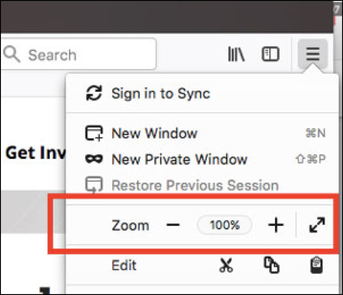
Use the + button to zoom in, and the - button to zoom out.
The number in the middle is the current zoom level - click it to reset the zoom to 100%.
Keyboard shortcuts:
You can also use the zoom controls without a mouse. Press and hold COMMAND while pressing + to zoom in, - to zoom out, or 0 to reset.
|
ASSOCIATION OF COMMUNITY HEALTH COUNCILS
1974 - 2003 This site is being maintained on a voluntary basis by Polly Healy ..._________________________________________________________ Please make contact if you have any contributions or suggestions for this site. Click here ... |
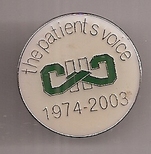
The ACHCEW Memorial Badge
|
-
ACHCEW
- COMMITTEES
-
CHCs
- Introduction to CHCs
- CHC Regulations
- How CHCs Worked
- Code of Conduct for CHC Members
- Code of Practice on Consultation
- Public Activities Material
- CHCs in Action - (Publication)
- The Politics of Consumer Representation - A Study of CHCs
- The Legal History of CHCs
- Legal - re. Closures
- Directory of CHCs + LINks >
-
Training and Skills for Members
>
- Skills for New CHC Members
- Understanding the NHS and the Role of the CHC
- Developing Skills as a CHC Member
- Links to CHCs and Charities Database
- Skills for CHC Chairs
- Other Training Documents
-
PPI Short Courses
>
- Introduction and Surveys
- Core 1 - User Involvement in Health and Social Care
- Core 2 - What does User Involvement Mean?
- Core 3 - Feeling Empowered in User Involvement
- Theme 1 - Involvement in Service Planning and Improvement
- Theme 2 - Involvement in Research and Activity
- General Units
- Link Person Handbook
-
Papers
- IN-HOUSE Staff Publications - Introduction >
- CHC Listings
- CHC News >
- CHC Public Activities Materials
- NHS Dispute - Complaint
- Presentations >
- Foundation Trust Hospitals
- GMC
- Healthwatch England
- Health Scrutiny
- House of Commons Health Committee
- ICAS
- King's Fund
- Normanton Hospital Inquiry
- PALS
- Local Involvement Networks - LINKs
-
PPI + LINks
>
- PPI Academic
- PPI in the NHS >
- Patient Empowerment >
- Public Representation of Health Bodies
- Women's Health Publications >
- Enter and View
- LINks Foundation Trusts
- Kingston Hospital + Kingston PCT LINk
- Public Involvement in the Private Finance Initiative
- Response to the Health Committee Report
- Private Hospitals
- PUBLICATIONS
- PRESS
- Cartoons
- Gallery